Saturday, June 23, 2018

Social Media in Education

Do you have a difficult time understanding social media and all their fancy updates? When Twitter first came out, I was completely lost. Tweets, likes, retweets, only 140 characters? It was all too confusing for me. That's why I sought out to find easier ways to understand and explain these platforms for people who were just as confused as me. Mashable made a list of 12 Essential Social Media Cheat Sheets (infographics) of different social media features.  

Twitter Etiquette? 

I didn't know there was a Twitter etiquette. This is a good infographic that relates Twitter to talking on the phone. Interesting for students to learn how to respond to others on Twitter!

Google+
How cool is this infographic? Was I the only one unaware of hotkeys? Students should be aware of privacy issues and how to prevent just anyone from looking at their accounts.


Google+


Where was this when I first joined Google+? This is super helpful for those are new to Google+ and would like to optimize their experience. Students can use Google+ to share photos of projects or events. For these infographics and more tips, visit Mashable.

Thoughts? 

I loved this website. Super useful but could be updated. I will say that the Google+ infographica were my favorite, as I still have some proficiency issues in that area. Students who don't use these platforms every day can use these tips and tricks to catch up or learn quick and easy. These infographics can be made into handouts or worksheets for students to carry with them and refer back to. 


Thursday, June 21, 2018

Looking back, looking ahead

Technology in the Classroom


Source


I don't think my opinions on this has changed. I think technology in the classroom to enhance education is beneficial for educators and students. It becomes an interactive experience that makes students look forward to learning and be more engaged.


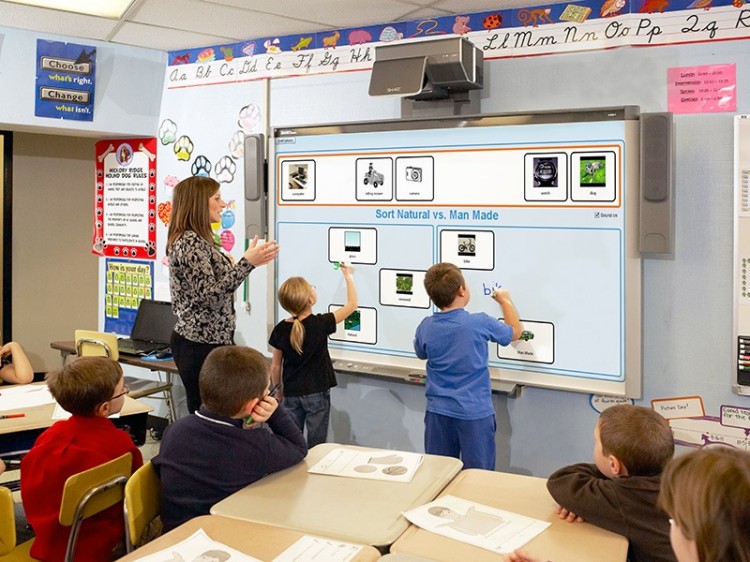
Kids today are advancing with technology at home and have become more proficient than we can imagine! We need to keep up with them in the classroom, and help them succeed with the tools they are familiar with. As you can see from these photos, classrooms have already changed and adapted to the students needs. Technology isn't going away. Students need to excel in the areas of technology to be proficient in their future careers. Telling students not to use online tools in the classroom is unrealistic, as we have access to almost anything at all times at our fingerprints.


Bouncy ball and laptops


Benefits of Technology in the Classroom

In discussing technology in the classroom, there's three main points I like to mention.
  • Again, it helps students stay engaged
  • Helps students become more responsible. Owning or borrowing electronic devices and taking care of them is a big responsibility (and we trust them!).
  • Teacher becomes an encourager, advisor, and coach. You have more control than you think
 
You may be unsure of what kind of technology to put in your classroom. This link offers great beginner tips. If you're still unsure, or don't have the funds to incorporate technology in the classroom, remember: the electronic device does not need to be in your classroom. This means you can have students work on online assignments at home on personal/family computers or at the library. If you're an educator, and you use technology in your classroom, please share your tips for other educators!


Digital Tattoo

Data Mining!

Have you ever heard of data mining? Well, I'm here to tell you, it's more serious than you think. The easiest way to describe this is: the ability to find new data from existing data to find patterns (data collection). Sounds harmless, right? Well, sometimes it can be. For example, in instances of networking, data mining can be a good thing. That being said, data mining is a controversial subject because it does create privacy and security issues.


What I Found

This was really surprising. Not only did I find my parents home address (my previous home), I also found cousins, uncles, and other family information. Creepy! Have you ever looked yourself up on Google? Who hasn't! There are tons more websites that have personal information on there than you think. Here are a few websites you may have never even heard of that you can use:

  • Spezify: As this website searches for information, it asks a series of questions to get the best results.
  • PeekYou: The intention of this website is to connect with friends/family/classmates but tends to go a bit further
  • BlockShopper: Look up your address (or a friends!), I lucked out on this one, as my house wasn't listed. BUT I did see my whole neighborhood on here. So, a bit invasive.
  • Radaris: You can look yourself up here, find any sex offenders as well. I found myself here, but all the information is wrong so I question the accuracy.


Students and parents:

It can be worrying to find all your private information on these sites. If you find any information on these websites that you don't want on there, you're able to call customer service and request they take it down. I've had friends do this with success. However, if they end up pulling information from a different database, your information might end up back on that website. You can check back on those websites periodically if you're really concerned about this.


Ron Swanson


Saturday, June 16, 2018

PLN

Twitter


Twitter is huge right now, especially with all the celebrities using it to create awareness and conversation. I use Twitter here and there, but I'm not up to date on the newest trends on there. I'm more involved with the main features of Twitter. I didn't really understand what live chats or live videos on Twitter were, because I wasn't familiar with that platform and format. Upon more exploration, I found it an interesting place to have good conversation. I got lost in everyone else's response, that I would change my opinion often. I've read so many different opinions on this topic. It's roots from a ketogenic diet. Some believe that this is the diet that may reverse diabetes. I read some conflicting information and a lot I've agreed with. 

Registered Dietitian chat, do you think keto diet can reverse diabetes?
Link here

More research! 

Reflection


I tend not to use Twitter for this type of purpose. Originally, I made a Twitter account for personal use and immediately forgot about it. Then, I went back onto Twitter to find the latest news and to stay updated in what's happening in our crazy world! I'm not totally on board for using it for conversing about nutrition or dietetics, but I'm not against it. What do you use Twitter for? 

I've linked my Twitter, feel free to follow me! @iamranaahmad


Wednesday, June 13, 2018

Web 2.0

Web 2.0 Tools

Web 2.0 tools are a great way to give educators and students a different way of accessing and sharing information. There's a good chance you use a web 2.0 tool and don't even know it. Pinterest, Twitter, Youtube are examples of the some of the most popular tools. There's tons of different tools that we have yet to discover, or don't use as often. If you remember the digital space map blog post, then this pyramid below may look a bit familiar. Using Bloom's Taxonomy, these educational web 2.0 tools were organized into learning domains.  

Creating: Putting parts together
Evaluating: Make judgements
Analyzing: Separates materials for better understanding
Applying: Use concept in real world situations
Understanding: Comprehending information
Remembering: Recall or retrieve previous learned information

As you can see, there's many different web 2.0 tools that can be used in the academic setting. This is a great way of integrating technology into the classroom without distraction!
Univ. Pittsburgh


Diigo


source


Diigo stands for digest of internet information, groups and other stuff. In regards to my last post, we talked about how important research is in the academic and education setting. Well, this a great tool for educators and students to use when researching materials. It helps organize, store, manage, and search for bookmarks of resources online. This tool makes it easy to highlight, create sticky notes, and screen shots that gets saved into the cloud, how cool!

In the academic world, it's easy for students and educators to get unorganized from the many tasks they need to accomplish. This is a great tool for students when writing research papers because it helps organize thoughts into one place, and can gets stored in the cloud. Click on my video to see how I'm currently using this tool! 

Thursday, June 7, 2018

Educational Technology Research

Source
Why Do We Look at Research in Education? 
Many people avoid research because it seems too confusing or difficult. However, if we don't use research, then we don't expand our knowledge or engage in critical thinking. At times, research can be used to challenge ourselves, as it can raise questions we weren't aware of asking. In education, research is important for improving practices, systematic analysis of topics, and develop new understandings related to teaching and learning. 

Even as a nutrition professional, I have to look at research often. Keeping up with the research helps me give the best nutrition advice. It also helps me defend or argue conflicting information in the media about nutrition (and there's a lot!). If you're interested in nutrition research, here's a link from the University of Virginia that I visit often! 

Common Sense Media
Media Use by Children Ages zero to eight
As many of us know, children are starting to use tablets and phones at a younger age now. The amount of children who use these technologies have increased exponentially. Below is the percentages of homes with mobile devices that have 0-8 year olds. Is this surprising to you? I have to say, I'm not really shocked by these results.

Research article

Here are just a few things this study found:

Article
  1. Mobile media have become a nearly universal part of the children’s media landscape, across all levels of society.
  2. The average amount of time spent with mobile devices each day has tripled (again), going from 5 minutes a day in 2011 to 15 minutes a day in 2013 to 48 minutes a day in 2017.
  3. Contrary to recommendations from pediatricians, many children use media shortly before bedtime, and many families leave the TV on in the background most of the time. (Who else is guilty of this?!)
    1. Children from lower-income homes spend an average of 1:39 more time with screen media each day than those from higher-income homes (3:29 vs. 1:50). Children from homes with lower parent education consume more screen media than children from homes with higher parent education (2:50 vs. 1:37; a 1:13 difference).
    2. The amount of time children spend reading each day has held steady since 2011, but many children under 2 are not read to regularly.
    See the rest of the findings here.

    I believe tablets and technology have their place in education when used properly but some of the findings from above are created from bad habits and abuse of technology. I'm not really surprise by some of these findings but I have to be honest, I was the most shocked at #5. As an aunt, I do see my nephews that love to read books but they love their tablet more (ha)! Which finding are you most shocked about?  


    Thursday, May 31, 2018

    Active Learning

    Active Learning

    Source
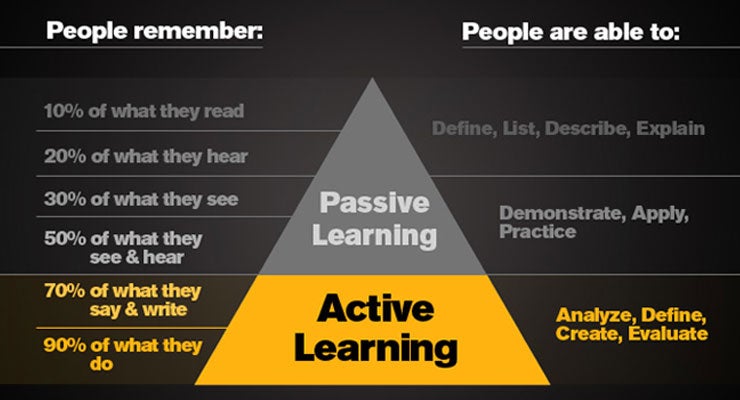
    Active learning is a form of learning that involves the students in more than just listening. In active learning, students are active participants and are engaged in their learning experience and collaborate with each other. The concept behind this is that students don't actively learn anything by just sitting in class and absorbing the material. Who remembers the days of memorizing and forgetting content? Well, this form of learning aims to eliminate that!


    Promote Active Learning

    Active Learning vs Passive learning/Source
    As you can see from the pyramid above, active learning is exponentially more effective than passive learning. There are two ways to promote active learning. One way is to have a mini lecture, thats no long than 20 minutes long, waits for students to make notes and finds any learning gaps that may have occurred in the lesson. The second way is to listen to a lecture for 20 minutes, don't take any notes, and then collaborate as a class/small group to elaborate on the lecture. Which one do you prefer? I'm totally in favor of the second technique! 


    How I Apply This

    I don't do too much teaching in my field. However, I apply this in my dietetics setting. I teach patients and residents how to carb count. Then I ask them to repeat and explain what I've just taught them. Then, together, we carb count their menu for the next day. This helps them better learn and apply what I've taught and put it in to action.

    A Year In Six Words

    This was based on a project for Coonley, a Chicago Public School. grades 1-7 were told to write their favorite part of their school year in six words! The students were told to reflect and base their memoir on: 

    • Telling something you like about Coonley 
    • What activity did you really enjoy this school year? 
    • Write about yourself 
    • Give advice to others

    This was a great way for students to reflect, think and collaborate together. Here's the link to see some of the students creative words! I also provided a photo and link to my Padlet.

    Thursday, May 24, 2018

    Mapping of My Digital Space

    Digital Mapping Space

    Have you ever thought about where you spend on the most time online? If you're anything like me, you love social media! Instagram, Facebook, Twitter, and Snapchat are among my favorite applications that I use most. However, there's other applications I'm currently using right now that I thought I'd give more insight on and how I apply some of them. For this weeks blog post, I want to share a mapping of my digital space. This activity definitely puts things into perspective!

    How To Get Started

    The easiest place to start is to figure out what applications you're using the most. Then, you should categorize them in what purpose you use them for: personal or professional. From there, you should determine whether you're a visitor or resident. If you're a visitor on that application, this means you're using it for a specific goal or task. If you're a resident, this means you often go to this application to connect or be with other people (i.e. social media). If you're interested in learning more or want to make your own map, click here.

    My Digital Map Space

    As you can see, I spend a lot of time on my phone and laptop with all these applications, ha! I enjoy connecting with my family and friends. However, I do find certain applications helpful for getting information. For example, the Waze application is a GPS that, not only helps me get around, but also tells me how long it'll take me to get to my destination in current traffic and any hazards or construction along the way. 

    Another website I visit often is The Academy of Nutrition and Dietetics. The website gives me tools and information to apply to my clinical experience. It has research articles, books, and even health tips.


    Digital mapping is a good idea to also figure out what applications you're just wasting time and space on your phone! Focus on the applications that are useful and you get enjoyment out of. You will find more success this way!


    Thursday, May 17, 2018

    Evaluating Framework

    SAMR

    photo credit
    SAMR allows educators to see the purpose of integrating technology in the classroom. SAMR is an acronym that stands for: Substitution, Augmentation, Modification, and Redefinition. Substitution refers to tech as acting as a direct tool substitute, with no functional change. Augmentation refers to tech as a direct tool substitute, with functional improvement. Modification refers to tech that allows for significant task design. Lastly, redefinition refers to tech as it allows for the creation of new tasks, previously inconceivable.

    How Is This Used?

    For example, in the picture below, you will see a picture of coffee. This is an example of substitution. As you can see, it is a plain, simple cup of coffee with no change.


    Next, you will see a picture of a latte below. This is augmentation and has a functional improvement. It has coffee elements, but has been changed to a slightly different form.


    Latte

    Here, we have an iced caramel macchiato. This is an example of modification, creating options we couldn't or wouldn't have thought about. We took the coffee, and transformed it into an iced caramel macchiato.


    iced caramel macchiato

    Lastly, we have an iced pumpkin spice latte. This represents redefinition. Something that would have been impossible to make from coffee without the use of technology (also very delicious!). 


    iced pumpkin spice latte

    Where Do I Find Myself?

    Although I do appreciate technology and what it can do to expand on information, I believe it can become a setback if not used adequately. If I'm being honest, I think I'm in the augmentation category. While I do prefer technology in the classroom, too much technology can hinder the learning experience.

    I think if I can come to a full understanding of redefinition, I'd be able to move to that category. I do find too much technology a bit overwhelming, and at times, I find myself spending a few minutes to figure certain things out. 

    Click here for more information on how to integrate SAMR into your class! 

    Thursday, May 10, 2018

    About me


    Background

    Hi, my name is Rana Ahmad and I'm a masters/internship student in Dietetics at Dominican University Crossing my fingers everything goes well! I currently work at Marianjoy Rehabilitation Hospital as a Registered Dietetic Technician (DTR). I want to become a Pediatric Dietitian. My future goal is to work in the neonatal intensive care unit to help premature babies thrive and grow. I truly believe I have the best support system to do this as my family and friends. Speaking of, I recently got married and this year we will be celebrating our 2 year anniversary come August.
    Engagement photo
    Wedding photo

    Family

    I believe family is everything. I come from an incredibly close family. After I got married, I moved about an hour away from them. For some people, that's still close. For me, it's too far! We make it work, though. Beyond my busy schedule, we still talk, facetime and text each other every day. 
    Extra points if you can find nephew #3

    I also have three nephews and they are my whole world. I've watched them grow into the sweetest boys anyone could ever ask for! 

    Lucky I got a still photo of ALL three! 

    Travel

    I love to travel even though I hate being on airplanes for long periods of time (anything can happen!). I try to go to new places but there are places, like Las Vegas, that I will never get enough of. Something about the city life that I'm obsessed with! My favorite place I've been to was Greece. I went to Athens and Santorini and it was the most beautiful place I've ever seen in my life, filled with so much history. I lost my camera on my last day there, so I don't have any pictures, unfortunately! I hope to continue traveling when I can, visit new places, and meet new people.
    Red Rock Canyon tour in Las Vegas, Nevada.

    Social Media in Education

    Do you have a difficult time understanding social media and all their fancy updates? When Twitter first came out, I was completely lost. Twe...